MAPLES: From group setup to human review
See how a small demo group moves from rubric setup to human review
Follow three coded demo records as you check the group, preview a rubric request, inspect the saved rubric, match it to a station, read a result beside its source note, and try a human review without saving it. Every screen uses made-up data, and the capture made no model or provider calls.
Interactive MAPLES tour
Check the demo group first
Make sure the Candle Making group contains only the three coded DEMO records used in this walkthrough.
Recorded demo · coded synthetic data · no provider calls
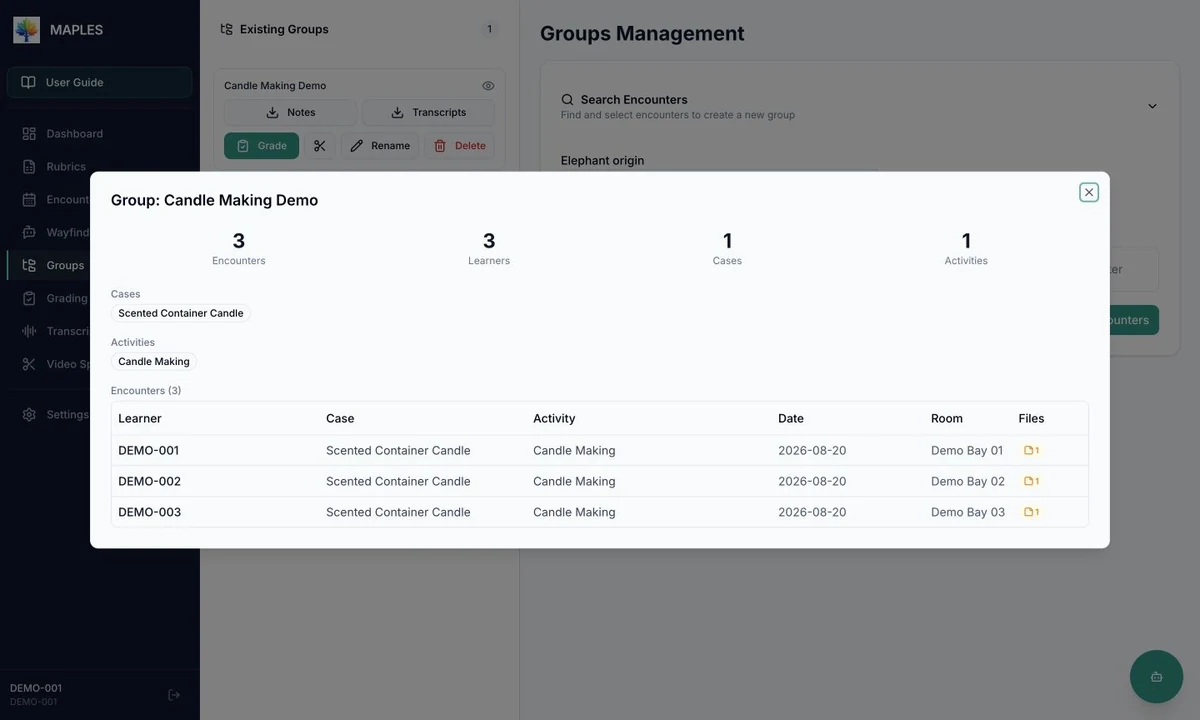
Check the group first
The demo group shows all three coded records up front, so an operator can confirm exactly what would be included before a real run.
Take one decision at a time
The tour stops at the rubric request, saved rubric, station match, result, and review screen in turn. This keeps each decision tied to the screen where it actually happens.
Keep the final say with a person
The review controls stay visible and deliberate. The final screen stops before saving, so you can see the decision without changing even the demo data.
What this tour represents
These screens show the production MAPLES React interface from OASIS commit 90031150529bbfa1a3de4f5769039fb91940ed08, connected only to a predictable test fixture on the same machine. The live MAPLES stack was not used, and no grading pipeline was launched for this capture. There were no provider calls, external service connections, outbound requests, or provider charges. Every displayed score, rationale, progress value, and review state was prepared for the demo—not produced by a model.
The page shows seven static WebP screenshots. Visitors do not connect to MAPLES or call its APIs. The public media manifest records the source version, what the capture did and did not connect to, file hashes and dimensions, proof that no model provider was called, and the privacy review.
The Perfume Making → Candle Making narrative was inspired by Minhan Park and Licheng Yi’s public walkthrough and video. All rubric wording, notes, scores, rationales, and coded records in this tour were newly authored. This is not a reproduction of the interns’ original prompts, outputs, data, runtime, or exact demo.
Wayfinder Rubric Studio helps people create or upload rubrics inside MAPLES. Wayfinder Operator is the separate CLI/TUI experience. They share a family name and related goals, but they use different interfaces and have different operating boundaries.
Read the seven-step walkthrough
- Group: Open the Candle Making group and confirm that it contains only DEMO-001, DEMO-002, and DEMO-003.
- Rubric path: Preview the reconstructed Perfume-to-Candle request in Create Rubric. It is never submitted, so Wayfinder and the provider are not called.
- Inspect rubric: Open the saved demo rubric and check its ready version, three text-note criteria, questions, and four scoring levels.
- Configure: Match Candle Making and Scented Container Candle to the Candle Making Station. The suggestion comes from prepared demo data, not a model.
- Run states: Compare prepared Running and Completed screens and their progress. The capture does not start a grading pipeline.
- Results: Select DEMO-001 and read its synthetic source note beside the prepared score, assessment, and rationale.
- Review: Choose score 3 and add a synthetic comment. The screenshot is taken before Save Review, so nothing is changed.