Elephant ingestion: From a folder to verified records
See an agent prepare a safe import, then browse the result in the OASIS CLI and TUI
Follow three coded Candle Making notes from a local folder into a clean Elephant demo service. An agent can inspect the folder and prepare the manifest, but OASIS performs the checks and import. The walkthrough pauses for approval before anything is written, then uses the TUI and read-only CLI commands to show exactly what arrived.
The agent exchange is a model-neutral illustration, not a transcript from Claude, Codex, Grok, or another named product. The recorded import uses only synthetic data and a local Elephant service. Visitors see an offline replay; opening this page contacts neither Elephant nor a model provider.
Agent-assisted Elephant walkthrough
Tell the agent what it may prepare
Ask the agent to inspect one synthetic folder, draft an import manifest, and stop before any upload.
Recorded locally · made-up Candle records · checked and loaded with OASIS
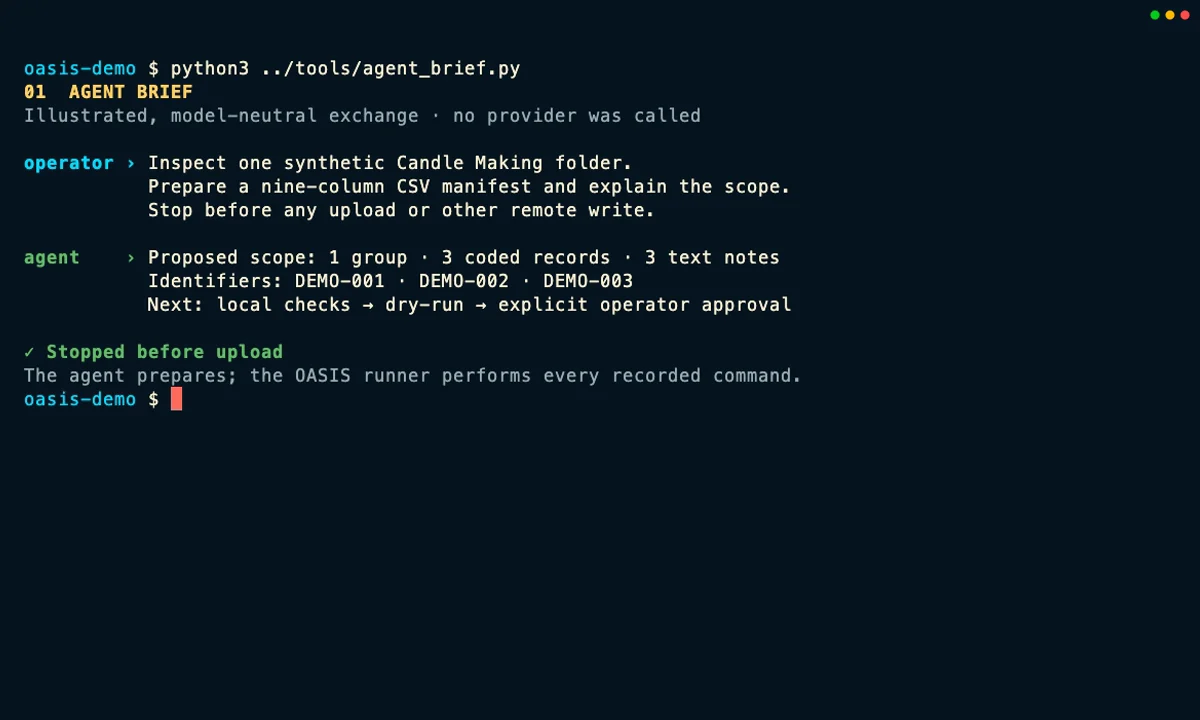
The agent prepares; OASIS runs
The illustrated agent inspects the synthetic folder, drafts the nine-column CSV manifest, and explains the proposed import. It never uploads a file. The runner invokes the real OASIS commands after the reviewed inputs pass their checks.
Approval belongs to the workflow
The approval gate shown here is a capture-harness policy, not a hidden prompt built into oasis data import. It binds the chosen local target to the manifest and file-set fingerprints; changed inputs require a fresh preview and approval.
Read back what was stored
The import summary is useful, but it is not the final proof. The walkthrough checks the group, encounters, file counts, and stored file metadata from Elephant with read-only commands and the TUI.
What the recording actually does
The recording uses a clean OASIS build, a fresh local Elephant service, and three newly authored synthetic text notes labeled DEMO-001, DEMO-002, and DEMO-003. Their addresses use the reserved example.com documentation domain. No learner, student, patient, customer, or other real-person data is used.
The domain-neutral Perfume Making → Candle Making storyline was inspired by Minhan Park and Licheng Yi’s public Wayfinder rubric-authoring walkthrough. The manifest, notes, identifiers, and capture shown here were newly created for this tour; none of the interns’ data, prompts, or outputs were reused.
The first screen is an illustrated, model-neutral exchange showing the instructions an operator could give Claude, Codex, Grok, or another capable agent. It is not a live model transcript and does not expose private reasoning. The remaining terminal and TUI screens are recorded from the actual local OASIS workflow. No external model provider is needed for ingestion, and the public page itself never connects to the recorded Elephant service.
During recording, the import runner reads a scoped write key from a private environment file; the key never appears in a command or on this page. Once the import finishes, the TUI and read-back commands use a separate read-only key.
Equivalent commands for reproducing the workflow
The capture wrapper requested JSON output and redirected selected results into private evidence files. The table keeps the equivalent, operator-friendly command forms so the workflow is easier to follow and reproduce.
| Goal | Command or action |
|---|---|
| Check that the local note files are readable | oasis data validate candle-data |
| Record a hashed inventory and stop on unresolved clarifications | oasis data scan candle-data --hash --summary-only --fail-on-clarifications --output evidence/scan.json |
| Preview the separate CSV import manifest without API calls | oasis data import manifest.csv --data-dir candle-data --dry-run |
| Run the unchanged, approved import | oasis data import manifest.csv --data-dir candle-data |
| Browse interactively | Run oasis interactive, enter : then mode elephant, press 2 for Groups, and use Enter to open the selected group and encounter |
| List the imported group from the CLI | oasis --format json elephant groups --cohort "OASIS Candle Demo" --all |
| List its encounters from the CLI | oasis --format json elephant encounters --cohort "OASIS Candle Demo" --all |
| Read the individual file metadata | oasis --format json elephant files --cohort "OASIS Candle Demo" --file-type notes_txt |
The scan writes JSON evidence about the local folder. That JSON is not transformed into the import CSV: the agent prepares manifest.csv separately, and the dry run validates it against the files before any API request occurs.
The final screen used a small private read-back helper to format the response. An equivalent direct CLI form is:
oasis --format json elephant files \
  --cohort "OASIS Candle Demo" \
  --file-type notes_txt |
  jq '.data.groups[] | {
    learner,
    encounter_id,
    files: [.resources[] | {
      file_id, file_type, size_bytes, file_hash
    }]
  }'
Retry and failure boundaries
An unchanged import is safe to retry, and Elephant can skip an exact duplicate upload. That does not make the whole command atomic or resumable: an early row can succeed before a later row fails, and OASIS does not write a durable per-row resume receipt for this command. A changed file can create or replace a stored version, so changed inputs must go back through preview and approval. After any interruption, inspect Elephant before deciding what to retry.
Complete recorded transcript
Read the nine-step walkthrough without JavaScript
- Agent brief: Ask a model-neutral agent to inspect the synthetic folder, prepare a nine-column CSV manifest, list what it proposes, and stop before upload. The illustrated exchange proposes one group, three coded records, and three text notes.
- Local checks: Let OASIS confirm that the files are readable and write a hashed JSON scan for review evidence. The strict scan stops if anything still needs clarification. These commands stay local and do not contact Elephant.
-
Preview: Give the separate CSV manifest and data folder to
oasis data import --dry-run. OASIS reads every row and file, reports the proposed import, and makes zero Elephant API calls or changes. - Approval: Review the local target, record and file counts, manifest fingerprint, and file-set fingerprint. The capture harness—not the CLI—records approval for that exact combination. Any change invalidates it.
-
Import: The runner executes the same command without
--dry-run. OASIS writes the reviewed synthetic records to the fresh local Elephant service and reports each created, reused, uploaded, duplicate, or failed item. - Group: Open the TUI, switch to Elephant mode, choose Groups, and select OASIS Candle Demo. The interface calls this a group; the tour does not invent a separate dataset object.
- Encounters: Press Enter to open the group, then move through the three coded encounters and check their activity, case, date, and room.
- Files: Press Enter again to open the encounter’s Files view. This screen groups files by encounter and reports a count; it does not show an individual row for each stored object.
- Read-back: Use a read-only JSON command to list learner, encounter, file ID, file type, byte count, and stored fingerprint. The current read-back did not return an original filename, so the tour does not claim to verify one.
The public capture manifest records the exact software revision, binary, input, and media fingerprints, observed import counts, hashes of the sanitized private evidence, local-only execution boundary, and privacy review. The raw logs and evidence files themselves are not published.
Explore every tour · Open the CLI & TUI tour · Open the Candle CLI & MCP tour · Open the MAPLES tour · Return home